

With the recent data breach involving Canvas, many students may ask:
“Why should I care about this? It’s not like they took something important like my social security number or my credit card number.”
While it is true that there is no indicated risk that any sensitive information was compromised (SBTS does not store that in Canvas anyway) and passwords were not compromised, information such as usernames and course enrollment data can still be used to create indirect risks later.
Some of the most effective phishing attempts can leverage non-sensitive information gathered from data breaches and social media to take advantage of the timing of an event, your emotion, and your trust.
Timing
Attackers view major events as prime opportunities that they can take advantage of to prey on a general awareness of the event and the vulnerability of people in a crisis. For example, it is not a coincidence that there is an uptick in phishing attempts every March and April related to the Internal Revenue Service leading up to Tax Day on April 15th. The Small Business Administration reported that they lost approximately $200 billion in fraudulent pandemic-related loans.
Following a data breach, it would not be uncommon for an attacker to pretend to be Campus Technology or a fake company offering identity protection services. Please be aware that Campus Technology will never solicit sensitive information from you in an email. The departments of SBTS will not email you from an email address that doesn’t end in @sbts.edu.
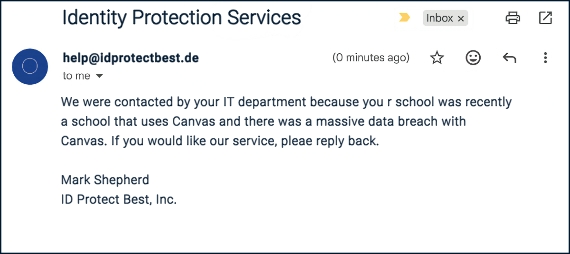
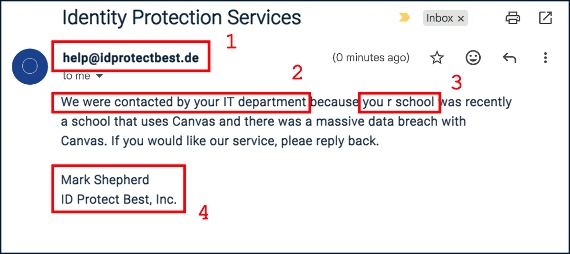
-
Always look at the domain of the sender. If you do not recognize the domain name, you can always perform a Google search of the domain to see what Google returns in its search results for the domain. In this search https://www.google.com/search?q=idprotectbest.de, Google does not find any results.
-
When the email indicates something suspicious such as “We were contacted by your IT department…” in this example, you should reach out to Campus Technology (or whatever department is specified) and verify that this is accurate.
-
While many phishing attempts are increasingly sophisticated, poor spelling and/or grammar can still be a good indication that the email is not legitimate.
-
Lastly, do not hesitate to do some investigation of your own. You can perform a Google search for the sender and the company name and see if you find any results that support the request being claimed. If you do find a real person or company, many companies have a contact email address you can use to reach out and verify the email.
Emotion
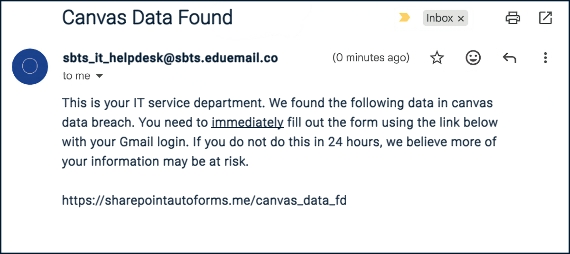
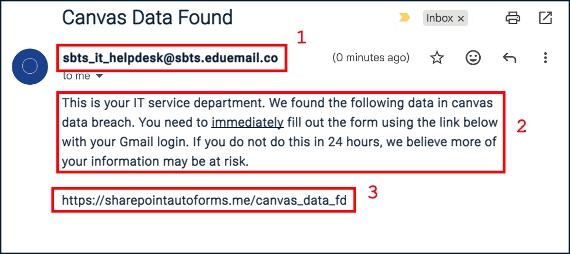
Attackers know that most people act less rationally when confronted with fear or excitement. Following the Canvas data breach, an example of a phishing attempt that creates a sense of fear and urgency may look like the following:
-
Do you recognize this email address? The Campus Technology email address is campustechnology@sbts.edu, but even if you are unfamiliar with that email address or still think it could be the real Campus Technology department, always look at the domain on the email address. In this example, the actual domain is eduemail.co. This is clearly not from SBTS.
-
Notice words like immediately and phrases like “If you do not do this in 24 hours…”. This language is meant to create a sense of fear and urgency. When you see this language, it is important to remember to pause and think before taking action.
-
Lastly, always remember to check the link, especially the target of the link. An attacker can easily craft a login page the nearly perfectly mimics the Google or Microsoft login page. Always check the actual URL in the web browser for the actual domain.
Trust
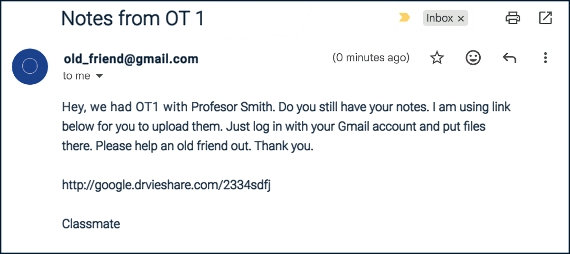
Attackers can also use information from a data breach or social media to craft emails that provide a sense that they know you. While some attackers may attempt to execute the exploit in the first email as in the example below, some attackers will begin the attack with a seemingly innocent email. The attacker will allow the conversation to progress through multiple email exchanges, building trust and momentum, before making a request of you.
-
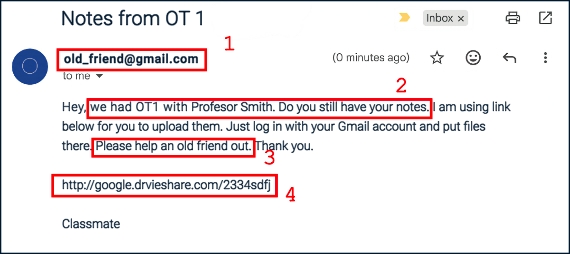
In this example, the attacker may use another student’s name that they obtained from a data breach or from social media to create an email account similar to that person’s name.
-
Once again, the attacker uses additional information combined with the sender email to continue to establish trust. When multiple facts are used in combination, it seems even more believable.
-
This request seems fairly innocent. This initial request may not raise any alarms in your head, but it may only be the first in a string of emails to come.
-
Again, make sure to examine the link carefully. In this example, notice that they used the subdomain “google” to appear consistent with the request, but notice the domain in this case: “drvieshare.com“. Not only is it not a real Google domain — it isn’t even spelled correctly!
IMage Credit: Photo by stephen momot on Unsplash