
A common phishing attempt that targets seminary and college students is the offer of a job or internship with a lucrative financial incentive. Unfortunately, these offers are nothing more than a tactic to solicit sensitive personal or financial information from the student.
An Example
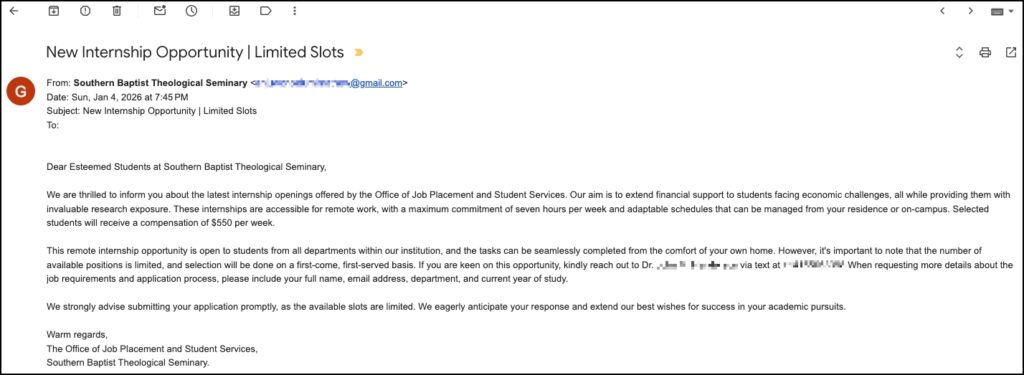
The image below highlights a recent example of this type of phishing attempt. The contact information has been hidden to prevent any future contact.
(Click here for a larger version of this image)
How Does It Work?
The initial email itself typically does not contain a link or any dangerous file attached. This helps the email bypass many security mechanisms that scan for common red flags indicating suspicious activity.
The sender’s name on the email will often be changed to something that you are meant to trust (“Southern Baptist Theological Seminary” in the example above), but the sender’s email address will typically be an email with a general email service such as gmail.com, outlook.com, icloud.com, etc. When you see this technique used, this is a key indication that the email is a phishing attempt.
These phishing attempts are usually written in a more formal or polished style than general phishing attempts in order to mimic a legitimate offer from the school. The content of the email will include details that are meant to gain your trust such as the name of a professor that they have obtained from the SBTS.edu or BoyceCollege.com websites.
Like most phishing attempts, however, the email contains several red flags. One red flag in the email message is that it intends to create a sense of urgency by describing the scarcity of the offer. In the example above, the email states, “…the number of available positions is limited, and selection will be done on a first-come, first-served basis.” Phishing attempts utilize language like this to leverage human psychology and emotions (e.g. fear, anger, panic) so that the target is more likely to respond. The other red flag in the email message is that the message directs the recipient to make contact directly using an alternative form of communication. This can be a mobile number to text, a WhatsApp username, a direct message to a social media account, etc. When you see this tactic, but are unsure whether the offer is legitimate, you should always find the primary contact information for the supposed sender on their website and reach out to them via that contact information. In the example above, you would search for the Office of Job Placement and Student Services on https://www.sbts.edu (spoiler alert — it doesn’t exist). That search would show that the appropriate office at Southern is called the Office of Career Development, which is not even the same name from the email signature.
When I Receive These Emails, What Should I Do?
Do not be alarmed or respond emotionally that you received the email. Phishing attempts are extremely common and are only increasing in frequency and sophistication. This attack method relies on casting a wide net and sending the email to as many recipients as possible in the hopes that at least one person responds.
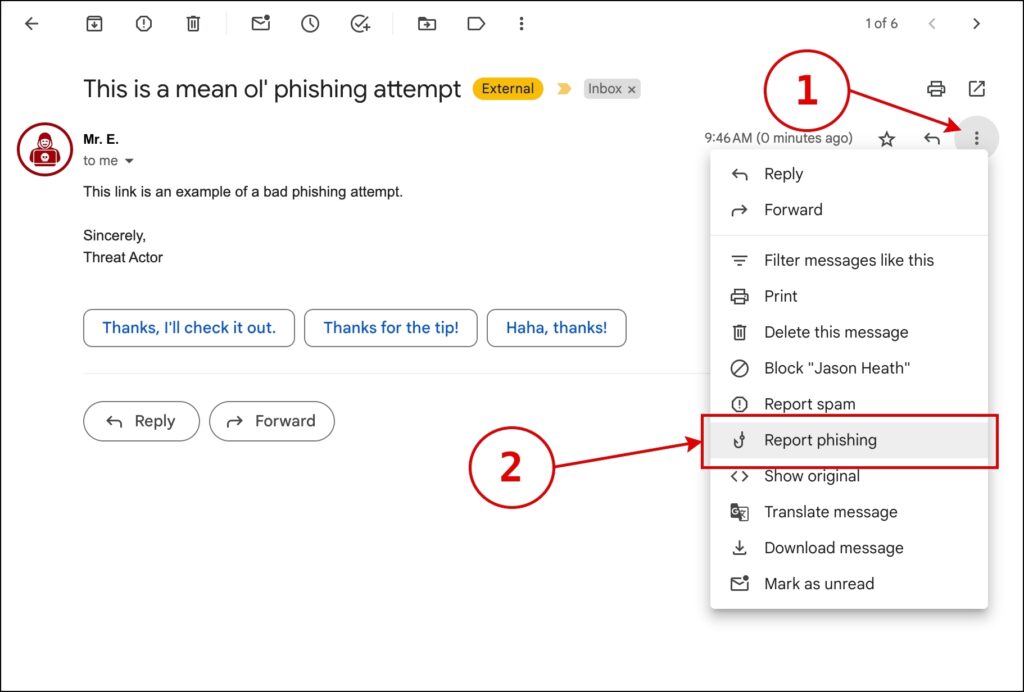
Please do not respond to the sender or contact the sender through the provided phone number or any other contact method described in the email message. You can feel free to delete the email, but you can also report the email as phishing within Gmail which helps Google’s systems to learn and identify these attempts better in the future. Please see the image below which shows how to report an email as phishing within the Gmail web interface.
(Click here for a larger version of this image)
I Responded To The Offer. What Should I Do?
With phishing attempts like this, attackers typically cast a wide net and are primarily interested in who responds. To an attacker, this can either initiate a thread of communication from which they can solicit increasingly sensitive information that is useful to them for future attempts.
Below are 3 possible scenarios that follow a phishing attempt like this and how you can respond, with the first scenario being most common and the last scenario far less common. In general, your best defense going forward is increased awareness and vigilance.
#1 – The most immediate risk is that you could see an increase in more personalized phishing attempts. With any information gained, attackers can craft future phishing attempts that target you directly using your personal information they obtained in this first phishing attempt to create more effective phishing attempts.
Example: Their next phishing attempt could be about a data breach at a former school or employer (information from your resume). The phishing attempt could contain a link to a fake website (that they control) offering identity theft protection services.
When there is accurate, personal information (like the kind of information they solicited in the first phishing attempt) in a future phishing attempt, people are more likely to trust the message and believe it is legitimate.
What You Can Do: Be on heightened alert for any emails, text messages, or phone calls from senders that you do not know. This article at cisa.gov provides useful details about how to identify these messages.
#2 – An attacker can use any information from a resumé or other information that you may have provided in any communication with them to pivot to a different type of attack. For instance, the attacker can use what they have so far to gather more of your data from a data broker, they can identify other accounts such as social media accounts that can be used to extort money from you, or they can even compromise an account. In your communication with the attacker, if you provided seemingly unimportant information such as your hometown or a pet’s name, that information can be used to answer security questions with a company or service that you use to gain access to that account.
Example: If the attacker has your cell phone number (the kind of information often on a resumé) and other personal information they may have solicited, they may be able to contact the cell phone provider to reset the password to your account or transfer your phone number to a phone in their possession.
What You Can Do: Reset the passwords on any important online accounts. You can start with your email account. An email account may seem trivial, but many companies such as banks, social media accounts, etc. use email accounts as a means to reset passwords through a “Forgot Password” tool. If an attacker can compromise an email account, the attacker may be able to reset passwords on other accounts.
#3 – Even if you did not provide any other information, your name and address can be used in a Change of Address Scam. That link to an article on Aura, an identity protection services company, provides details, but in summary, this is where the attacker asks the US Postal Service to forward your mail to a new address. They can then look through your mail for any additional sensitive information.
What You Can Do: Look for any changes in the frequency of the mail that you receive, even advertisements and junk mail. If your mail seems to suddenly stop, you can contact the USPS to File a Dispute. The USPS should mail a confirmation to you when they receive a Change of Address request before making the change, but depending on how the attacker requested the change, the notification does not always happen.
If you have any additional questions, please don’t hesitate to reach out to us at phishing@sbts.edu. If the phishing attempt escalates and your accounts are compromised or your identity is stolen, you can report the fraud at https://reportfraud.ftc.gov/.