
Update / June 11, 2026 9:00Am ET
After the changes to the Microsoft 365 accounts were completed, many students have had issues with their desktop Microsoft Office applications such as Microsoft Word, Excel, OneDrive, and Teams authenticating correctly with the new account. As we have worked with many students to fix these issues, we have refined and condensed the steps to resolve these issues and documented them below. If you are still struggling to resolve issues with logging into the Microsoft Office client applications, please find the instructions below for your system and follow the directions thoroughly and carefully to resolve your issues. As always, if you still have trouble, you can email us at campustechnology@sbts.edu.
Update / May 7, 2026 1:00pm ET
For Active students:
The main phase of the migration has completed. All active accounts were moved into the new Microsoft account. A few issues have arisen and are detailed below.
Issue: “Not all of my OneDrive files moved to the new account” or “I’m missing some files”
After the initial email went out indicating that your account was migrated, the process that was moving files into the new OneDrive accounts was still catching up. We have been running an additional process to look for any differences and most of these issues have been resolved. If you believe you are still missing files in your new OneDrive account, please email campustechnology@sbts.edu and let us know. We have complete backups of what was on the old account, so nothing has been lost in this process.
Issue: “When I tried to sign back into the Microsoft Word desktop application, I received this error” with error text similar to the text below
AADSTS50020: User account your_username@students.sbts.edu from identity provider https://sts.windows.net/6d122a55-7458-44d7-9133-eSdc3a37ce63/ does not exist in tenant The Southern Baptist Theological Seminary and Boyce College’ and cannot access the application d3590ed6-52b3-4102-aeff-aad2292ab01c'(Microsoft Office) in that tenant. The account needs to be added as an external user in the tenant first. Sign out and sign in again with a different Azure Active Directory user account.
This is probably the most widespread issue we have seen. Both Windows and macOS have programs built into them to keep copies of your credentials when you log into applications like Microsoft Office applications. In Windows this is called Credential Manager and in macOS this is called Keychain. For many students, after signing back into the desktop applications, their operating system is still retaining the login to the old Microsoft 365 account.
To resolve this issue, we have developed a tool that you can download and run to resolve this issue. You can download the tool for Windows below.
For Windows 10 and Windows 11:
For macOS:
For macOS, the security features in macOS make it more difficult to run the repair tool without first modifying some settings. Please view the screencast below for directions on how to run the tool on macOS.
For Inactive students:
Your Microsoft 365 account is no longer active. Unfortunately, the process that is moving your OneDrive files to your Google Account is taking longer than expected. Please know that we have backups of all OneDrive folders, so no files have been lost. We will notify you once all accounts have been moved to Google Drive.
What is happening?
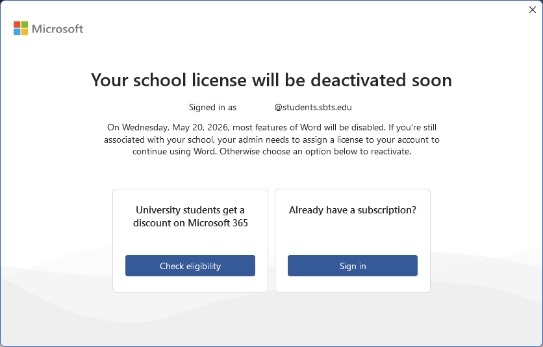
Microsoft is in the process of eliminating the license that has been used for students.sbts.edu Microsoft 365 accounts. This is the license that has allowed SBTS and Boyce College students to download the Microsoft Office applications to their computer at no cost. This is an industry-wide transition that has affected many educational institutions; not just SBTS. Many schools have made this transition over the past year. Due to this change, many students have recently received a pop-up when using the Microsoft Office desktop applications with the message “Your school license will be deactivated soon”.
Consistent with other changes happening with SBTS student accounts, the impact on your account depends on your current enrollment status.
You are considered an active student if you are currently registered for a course or have completed a course within the last 8 semesters, or approximately 2 years. Once 8 semesters have passed, your account becomes inactive.
How does this affect you?
The Campus Technology department is executing a plan to migrate the Microsoft 365 accounts for all Active students to a new Microsoft account that will have a license allowing for continued access to the Microsoft Office desktop applications. In an attempt to minimize the impact on each student, Campus Technology will create the accounts and move OneDrive into the new accounts. After the migration, students will need to update their passwords and login again to any applications that used their Microsoft 365 credentials.
In coordination with the broader changes to eliminate Google and Microsoft 365 student accounts for Inactive students, those Microsoft 365 accounts will not be migrated to the new system.
What will I need to do?
For Active students:
- SBTS will move your Microsoft 365 user into a new account. Your username will remain exactly the same (your @students.sbts.edu student email address).
- From 8:00 AM EDT, Tuesday, May 5, 2026 through 5:00 PM Wednesday, May 6, 2026, student Microsoft 365 accounts will not be accessible. We hope that the migration will not last the full duration of the outage. An email will be sent out once the migration is complete.
- Any files that you currently have in Microsoft OneDrive will be transferred to Microsoft OneDrive in the new account. The structure of your OneDrive account will be the same, but please note that starting in the fall 2026 academic term, a 25 GB quota will be put in place, so if you currently have more than 25 GB of data in Microsoft OneDrive, you should begin moving your files beyond that 25 GB limit to a personal account or an external hard drive.
- After your new account is created, you will receive an email with a temporary password. You will then need to log into the new account and update your password.
- After you have updated your password, you will need to sign out of your Microsoft Office desktop applications and log into them again.
For Inactive students:
- By 5:00 PM Wednesday, May 6, 2026, you will no longer have access to your students.sbts.edu Microsoft 365 account. Any installed Microsoft Office desktop applications may work for a while, but they will eventually disable the ability to edit Office documents.
- Any files that you currently have in Microsoft OneDrive will be transferred to a folder in your student Google Drive account named “Microsoft One Drive Transfer“. Please note that your Google account will also be deleted on July 15 as a part of the broader student account changes, but this will allow you additional time to download both your Google Drive files and your Microsoft One Drive files from a single location.
- In order to keep these files from Microsoft OneDrive and Google Drive, you must transfer your files to a personal account or an external hard drive before July 15. After July 15, your Google account will also be terminated.
Frequently Asked Questions
You can create a free Microsoft 365 account that will allow you to use Microsoft Word in a web browser. To create a free Microsoft 365 account, please use this link. Please create this account using a personal email address, not your students.sbts.edu email address.
Otherwise, there are many free alternatives to using Microsoft Word to edit Word documents, including open source applications that you can install.
You can edit Word Documents in Google Docs
You can edit Word Documents in Libre Office (free to download and use)
You can edit Word Documents in Open Office (free to download and use)
If you want to use the Microsoft Office desktop applications, you can either purchase the Microsoft Office software with a one-time purchase on its own, or you can purchase a personal or family Microsoft Office subscription.
Below are some potential options for purchasing Microsoft Office 2024 (the latest version) or on its own or subscribing to Microsoft 365.
* Please note that these links are only provided as options and SBTS does not have any special partnership with any of the retailers below in terms of discounts, commissions, or endorsement. These links may also be updated at any time by their respective owners, so if the link does not work when you attempt to access it, you may need to search for an updated link.
- Purchase Microsoft Office 2024 from Microsoft
- Purchase Microsoft Office 2024 from Amazon
- Purchase Microsoft Office 2024 from Best Buy
- Review Personal/Family Microsoft 365 Subscription Plans
If you are missing files after the migration is complete, please email Campus Technology and we will attempt to find the missing files and make sure they are delivered to your new OneDrive account.
Unfortunately, with the storage quotas implemented by both Microsoft and Google, we are no longer able to provide accounts or cloud storage for Inactive students.
All files must be moved before the July 15, 2026 deadline. The accounts will be deleted after that date.
For any other questions, please email campustechnology@sbts.edu and we will respond as soon as possible.
Last updated: May 1, 2026 4:00 PM